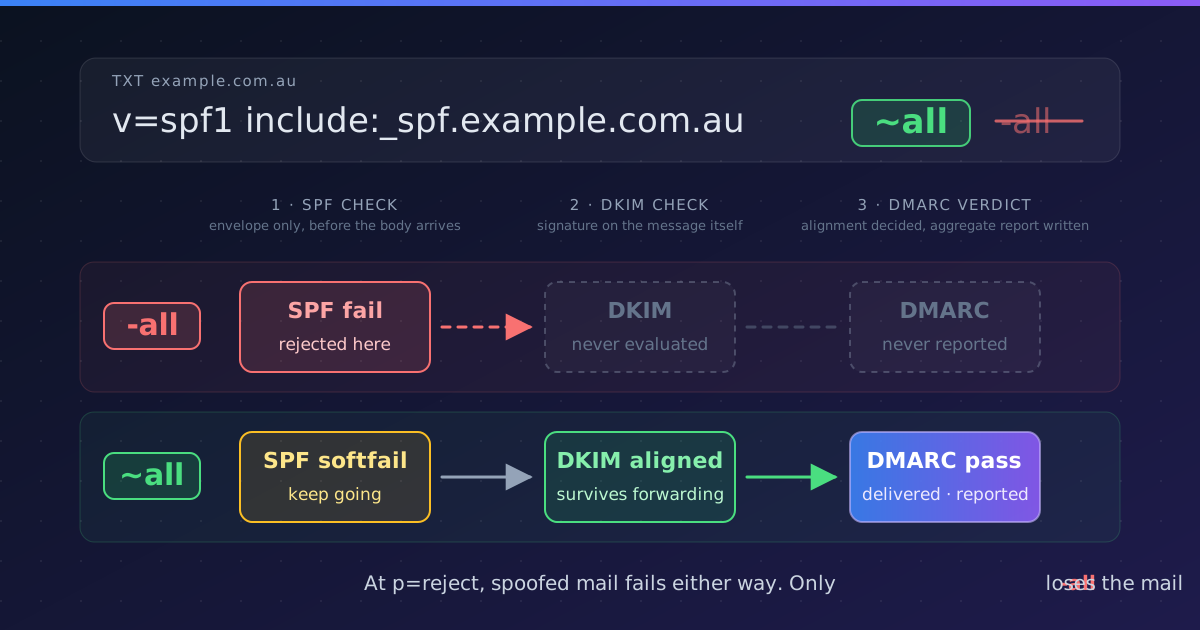
SPF alignment issues are one of the most common causes of DMARC failures. Even when your SPF record is correctly configured and email passes SPF authentication, DMARC can still fail if SPF doesn't "align" with the From: domain. This frustrating scenario catches many organizations off guard.
This comprehensive troubleshooting guide explains SPF alignment in detail, identifies common causes of alignment failures, and provides step-by-step solutions to fix them.
Understanding SPF Alignment
🎯 The Core Concept
For DMARC to pass with SPF, two conditions must be met:
- SPF must pass: The sending IP must be authorized in the SPF record
- SPF must align: The domain in SPF check must match the From: domain
Many people think SPF passing is enough for DMARC—it's not. Without alignment, DMARC fails even with valid SPF.
The Two SPF Domains
1. RFC5321.MailFrom (Envelope From)
The domain used in the SMTP envelope MAIL FROM command. This is what SPF checks.
- Also called: "Return-Path", "Bounce Address", "Envelope Sender"
- Not visible to end users in email client
- Checked against SPF record
2. RFC5322.From (Header From)
The domain in the From: header that users see.
- What users see as the sender in their inbox
- Used for DMARC alignment check
- Must match or align with RFC5321.MailFrom for DMARC to pass
Relaxed vs Strict Alignment
Relaxed Alignment (Default)
aspf=rin DMARC recordRule: Organizational domains must match
✅ Passes:
From: sender@mail.example.com
MailFrom: bounce@example.com
(Both share example.com)
Strict Alignment
aspf=sin DMARC recordRule: Domains must match exactly
❌ Fails:
From: sender@mail.example.com
MailFrom: bounce@example.com
(Subdomains don't match exactly)
⚠️ Most Organizations Use Relaxed
Relaxed alignment (aspf=r) is the default and works for 95% of use cases. Only use strict alignment if you have specific security requirements and control all subdomains.
Common SPF Alignment Failure Scenarios
Scenario 1: Email Forwarding
Problem: When email is forwarded, the envelope sender stays as the original domain, but it now comes from a different IP.
Original Send:
From: [email protected]
MailFrom: [email protected]
Sending IP: 192.0.2.1 (authorized in company.com SPF)
Result: SPF Pass, Aligned

After Forwarding:
From: [email protected] (unchanged)
MailFrom: [email protected] (unchanged)
Sending IP: 203.0.113.50 (forwarder's IP)
Result: SPF Fail (IP not in company.com SPF)
Why it breaks: The forwarder's IP isn't authorized in company.com's SPF record.
Solutions:
- Best: Enable DKIM (survives forwarding) so DMARC passes even if SPF fails
- Alternative: Ask forwarder to use SRS (Sender Rewriting Scheme)
- Workaround: Add forwarder's IPs to your SPF (not scalable)
Scenario 2: Third-Party Email Services
Problem: Marketing platform sends with your From: domain but uses their domain as MailFrom.
From: [email protected] (your domain)
MailFrom: [email protected] (their domain)
Sending IP: 167.89.0.1 (SendGrid IP)

SPF Check: Pass (IP authorized in sendgrid.net SPF)
DMARC Alignment: Fail (company.com ≠ sendgrid.net)
Why it breaks: SPF checks sendgrid.net, but DMARC needs company.com alignment.
Solution:
- Configure custom return path:
[email protected] - Add service's DNS records to your domain
- Service sends with MailFrom using your domain
- SPF passes against your domain → alignment achieved
📝 Provider-Specific Terms:
- SendGrid: "Custom Return Path Domain"
- Mailchimp: "Authenticated Domain"
- Mailgun: "Domain Tracking"
- Constant Contact: "Custom DMARC Domain"
Scenario 3: Mailing Lists
Problem: List server sends email "on behalf of" original sender, but modifies MailFrom.
Original:
From: [email protected]
MailFrom: [email protected]

List Server Sends:
From: [email protected] (preserved)
MailFrom: [email protected] (changed)
Sending IP: 198.51.100.1 (list server IP)

Result: SPF Fail (IP not in company.com SPF)
Why it breaks: List server changes MailFrom to handle bounces, breaking alignment.
Solutions:
- Modern lists: Use DKIM, which survives list processing
- List configuration: Enable ARC (Authenticated Received Chain)
- User option: Subscribe with email address from domain that doesn't enforce DMARC
Scenario 4: Subdomain Mismatch with Strict Alignment
Problem: Using strict alignment with subdomains.
DMARC Record: v=DMARC1; p=reject; aspf=s; ...

Email Sent:
From: [email protected]
MailFrom: [email protected]
Sending IP: 192.0.2.1 (authorized)

SPF: Pass
DMARC: Fail (strict requires exact match)
Why it breaks: Strict alignment (aspf=s) requires exact domain match, subdomains don't count.
Solution:
- Option 1: Use relaxed alignment (aspf=r or omit aspf entirely)
- Option 2: Ensure From: and MailFrom: use identical domains
- Option 3: Rely on DKIM for DMARC pass (doesn't have this issue)
Diagnostic Tools
Reading Email Headers
To diagnose alignment issues, you need to examine the full email headers. Look for these key headers:
Key Headers to Check:
Return-Path:         ← MailFrom domain
From: "Alice"         ← Header From domain
Authentication-Results: mx.google.com;
  spf=pass smtp.mailfrom=example.com     ← SPF result + domain checked
  dmarc=fail (p=REJECT) header.from=company.com  ← DMARC result
In this example: SPF passes for example.com, but DMARC fails because example.com doesn't align with company.com.
Testing Tools
Mail-Tester.com
Send test email to their address, get instant feedback on SPF, DKIM, DMARC, and alignment.
FreeGoogle Postmaster Tools
Shows DMARC pass rates and authentication failures for email sent to Gmail addresses.
Gmail UsersDMARC Reports
Aggregate reports show SPF pass/fail and alignment status for all your email.
Best for ScaleMxToolbox
Check SPF records, DMARC records, and test email authentication.
DiagnosticsStep-by-Step Troubleshooting Process
Step 1: Confirm SPF Passes
Check email headers for: spf=pass
If SPF fails, fix SPF first (wrong IPs, missing include, 10-lookup limit exceeded).
If SPF passes but DMARC fails → alignment issue.
Step 2: Identify the Domains
From headers, extract:
- smtp.mailfrom= → MailFrom domain (SPF checks this)
- header.from= → From domain (DMARC aligns this)
If these domains don't align, that's your problem.
Step 3: Check DMARC Alignment Mode
Look at your DMARC record:
- aspf=r or missing: Relaxed (organizational domains must match)
- aspf=s: Strict (exact domain match required)
If using strict, consider switching to relaxed unless you have specific security requirements.
Step 4: Fix the Alignment
For Third-Party Services:
- Configure custom return path/authenticated domain
- Add provider's DNS records to your domain
- Test after configuration
For Forwarding Issues:
- Enable DKIM (primary solution)
- Request forwarder use SRS
- Accept that some forwarded email may fail (unavoidable without DKIM)
For Subdomain Issues:
- Use relaxed alignment
- Or ensure From: and MailFrom: use same domain
Step 5: Test and Monitor
After making changes:
- Send test email to mail-tester.com
- Verify both SPF and DMARC pass
- Monitor DMARC reports for 7 days
- Check that pass rate has improved
Prevention Strategies
Avoid alignment issues before they happen:
- Always configure custom return paths when using third-party email services
- Enable DKIM on all sending services as backup authentication method
- Use relaxed alignment unless you have specific security requirements for strict
- Test email authentication before launching new email campaigns or services
- Monitor DMARC reports weekly to catch alignment issues early
- Document your email infrastructure including all services that send email
Conclusion
SPF alignment failures are fixable once you understand the root cause. The key is identifying whether the issue is forwarding, third-party services, mailing lists, or subdomain configuration.
Remember the two-part requirement:
- SPF must pass - IP authorized in SPF record
- SPF must align - MailFrom domain matches From: domain (with relaxed or strict rules)
Most importantly: Enable DKIM on all your email services. When DKIM is properly configured, DMARC can pass even if SPF fails or doesn't align, providing crucial redundancy for email authentication.
Diagnose SPF Alignment Issues Automatically
DMARC Busta identifies SPF alignment failures, pinpoints the cause, and provides step-by-step fixing instructions.
Start Free Trial